SafeProtect VPN Online Privacy1.1
Publisher Description

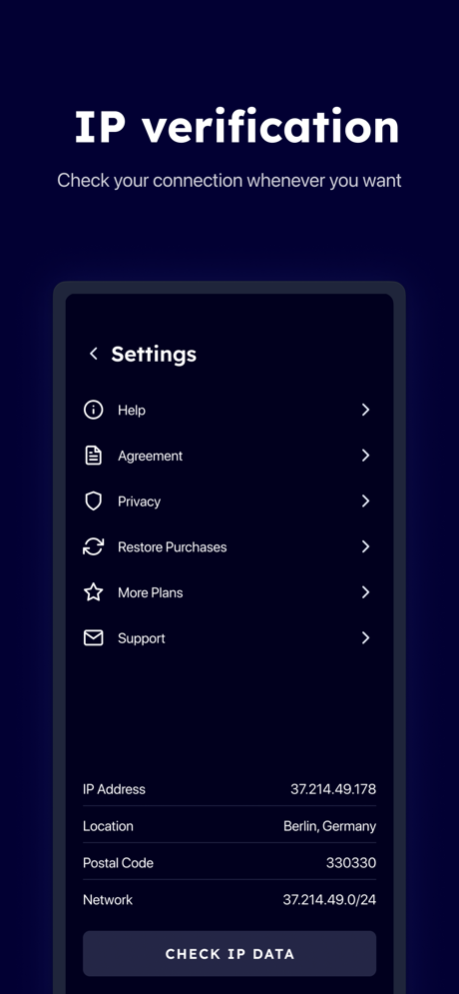
Welcome to SafeProtect VPN, your ultimate partner for safe and secure internet connectivity. This powerful iOS VPN provides a robust suite of features, ensuring your online activities remain private, your data remains secure, and your peace of mind remains intact.
VPN Service
Our VPN feature allows you to browse the internet anonymously. It masks your IP address, encrypts your data, and provides a secure connection to the internet. Enjoy unrestricted access to global content, evade digital surveillance, and protect yourself from data thieves on any public Wi-Fi.
Password Generator
In a digital world where data breaches are
commonplace, our password generator feature is an indispensable tool. It creates strong, unique passwords that you can use to secure your online accounts. Don't let weak passwords be your downfall; let our app fortify your digital fortress.
IP Address Checker
Knowledge is power, and our IP Address Checker gives you that power. Confirm the success of your VPN connection by checking your IP address before and after. It's a simple yet effective tool for ensuring your online anonymity.
With SafeProtect VPN, you get a multifaceted utility that values your privacy as much as you do. Download today and start your journey towards a safer, more secure digital existence.
Unlock premium features with an auto-renewing subscription. Choose from our 1 Year, 1 Month, or 1 Week plans and enjoy exclusive benefits like ad-free browsing, unlimited downloads, and priority support. Payment will be charged to your iTunes Account at confirmation of purchase. Subscriptions automatically renew unless you turn off auto-renew at least 24 hours before the end of the current period.
To manage your subscription and turn off auto-renewal, go to your Account Settings after purchase. Please note that you cannot cancel your current subscription during its active period. If you wish to cancel your subscription during the free trial period, you can do so through your iTunes account settings.
Please visit http://support.apple.com/kb/ht4098 for more information. Upgrade to premium now and experience the full potential of our app.
Privacy https://retiremob.com/privacy.html
Terms https://retiremob.com/terms.html
Aug 18, 2023
Version 1.1
Bugs squashed, new remote servers are added!
Enjoy!
About SafeProtect VPN Online Privacy
The company that develops SafeProtect VPN Online Privacy is Re-Tire Protective internet developments. The latest version released by its developer is 1.1.
To install SafeProtect VPN Online Privacy on your iOS device, just click the green Continue To App button above to start the installation process. The app is listed on our website since 2023-08-18 and was downloaded 0 times. We have already checked if the download link is safe, however for your own protection we recommend that you scan the downloaded app with your antivirus. Your antivirus may detect the SafeProtect VPN Online Privacy as malware if the download link is broken.
How to install SafeProtect VPN Online Privacy on your iOS device:
- Click on the Continue To App button on our website. This will redirect you to the App Store.
- Once the SafeProtect VPN Online Privacy is shown in the iTunes listing of your iOS device, you can start its download and installation. Tap on the GET button to the right of the app to start downloading it.
- If you are not logged-in the iOS appstore app, you'll be prompted for your your Apple ID and/or password.
- After SafeProtect VPN Online Privacy is downloaded, you'll see an INSTALL button to the right. Tap on it to start the actual installation of the iOS app.
- Once installation is finished you can tap on the OPEN button to start it. Its icon will also be added to your device home screen.
Program Details
System requirements
Download information
Pricing
Version History
version 1.1
posted on 2023-08-18
Aug 18, 2023
Version 1.1
Bugs squashed, new remote servers are added!
Enjoy!
